All apps / Card Wall
CW
JiraCard Wall
Print Jira issues as cards for the paper board, the sprint wall and the planning session.
Overview
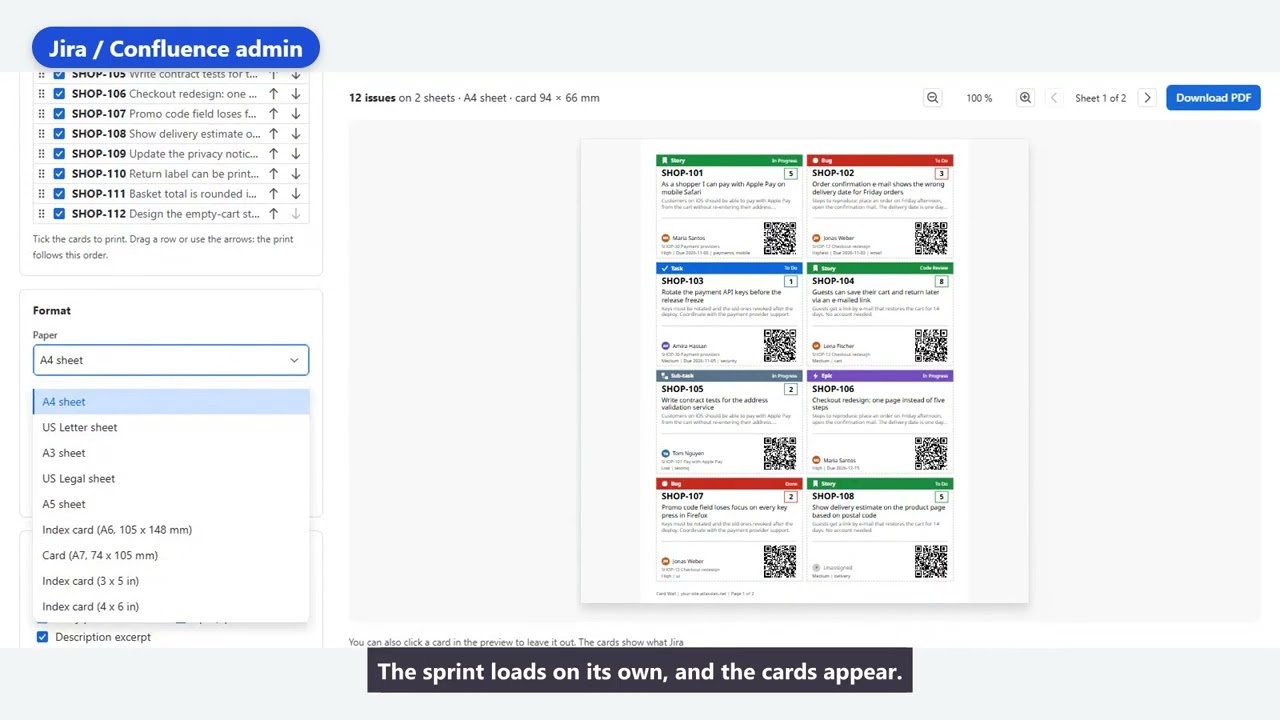
Some teams plan on paper. Card Wall turns a board, a sprint or any JQL result into printable cards, with a preview of every sheet before it prints.
Features
What you get.
- Pick a board (optionally a sprint) or enter your own JQL. The default is the whole board in rank order.
- Preview every sheet before printing. One click on a card leaves it out.
- Formats A4, Letter, A6, sticky note 3 x 3 in and label 2 x 4 in, portrait or landscape, 1 to 12 cards per page, with cut lines or corner marks.
- Choose the fields and their order, add a QR code to the issue and your own logo.
- Start from the board, backlog and issue menus or from search results.
- Templates (private or shared) and a history of your last 20 exports.
- Up to 500 cards per print. The PDF is created in your browser.
- Runs as you, so cards only show issues you may see.
Join the Card Wall waitlist
Card Wall is not in the Atlassian Marketplace yet. Leave your email and we write to you when it is ready.
- Priority Support. Waitlist members are answered first, before and after launch.
- Early access. You are invited before the public launch.
- Share and move up. After you join you get a personal link. Every friend who joins through it moves you further up the invite list.
Pricing
Free for up to 10 users, tiered after that. The price is shown with the Marketplace listing.
Card Wall
Print Jira issues as cards for the paper board, the sprint wall and the planning session.